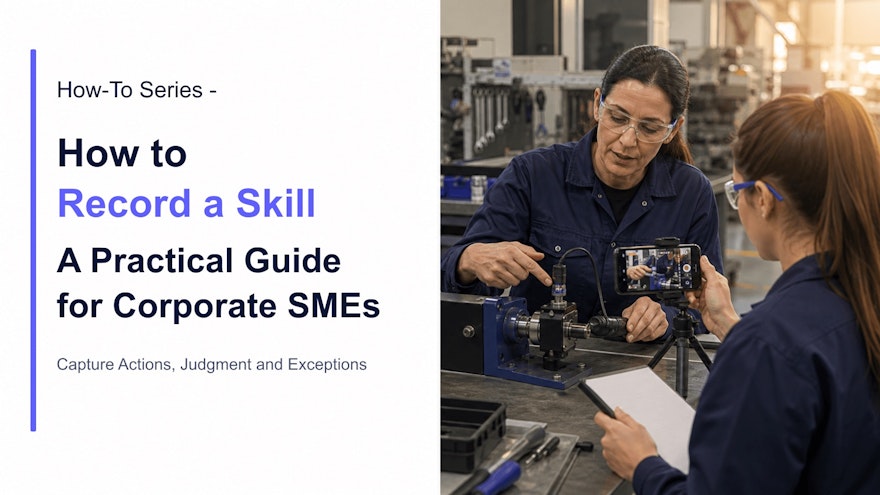
Ask an experienced technician how she knows a pump is beginning to cavitate, and she may say, “You can hear it.” Ask a quality investigator how he spots the weak point in a deviation narrative, and he may point to a missing sequence that no checklist mentions. Experts notice patterns before the rest of us even know what to look for.
That is the knowledge companies struggle to preserve. It lives partly in documents and partly in hands, eyes, ears and decisions shaped by hundreds of real cases. A conventional interview can capture a story. A screen recording can show clicks. A well-designed skill recording captures the performance itself—and enough expert reasoning for another person to understand when and why it applies.
What it really means to record a skill
“Record a skill” sounds like “make a video,” but the two are not identical. A video can show an expert talking for 25 minutes without making the skill easier to perform. A skill recording has a defined learner, situation and outcome. It reveals five layers:
- Action: what the expert physically or digitally does;
- Cue: what they notice before choosing an action;
- Decision: how they distinguish normal from abnormal;
- Exception: when the usual method no longer applies;
- Standard: how they know the result is acceptable.
Imagine recording a line-clearance check. Showing the sequence is useful. Showing where experienced operators look first, which residue is easy to miss, what must never be touched, when to stop and how the completed state should appear makes the recording operationally useful.
The final asset may become role-based training, a video work instruction, an assessment, a troubleshooting guide or a digital job aid. The format follows the need. Training prepares someone to understand and practice; point-of-work guidance helps them execute accurately later.
Why SME knowledge capture matters now
Skills are moving targets. The World Economic Forum’s Future of Jobs Report 2025 says employers expect 39% of workers’ existing skill sets to be transformed or become outdated by 2030. In the same research, 85% of surveyed employers expected to prioritize workforce upskilling.
Learning teams feel that pressure. LinkedIn’s 2025 Workplace Learning Report found that 49% of learning and talent-development professionals reported pressure from a skills crisis. Only 36% of organizations in its survey qualified as “career development champions” with mature programs connected to business outcomes.
Those figures do not prove that video solves a skills crisis. They do show why companies cannot depend on occasional classroom programs or hope that expertise spreads by proximity. Hybrid work, multiple sites, employee mobility and faster process change all weaken informal knowledge transfer.
Recording a skill gives an SME leverage. Instead of repeating the same demonstration for every shift and new hire, the expert creates a reusable starting point. Coaching still matters—especially for judgment and physical competence—but the first explanation no longer disappears when the conversation ends.
It can also improve the knowledge itself. When an expert narrates a task and a colleague asks, “What made you check that?” an invisible decision becomes discussable. The team can compare practice with the approved process, identify a useful improvement or catch an unsafe workaround before it spreads.
APQC’s 2025 research on the future of knowledge-management roles highlights subject-matter experts as important to effective knowledge transfer and adoption. The practical implication is straightforward: SMEs should not be treated merely as people who approve content at the end. They are central participants in discovering what the organization actually needs to preserve.
Choose the right skill to capture
Do not begin with “record everything our experts know.” That brief guarantees an intimidating project and a library no one can navigate. Start with a business moment where access to expert performance would make a visible difference.
Good candidates are skills that are:
- performed frequently across shifts, teams or sites;
- difficult to explain with text alone;
- associated with errors, rework, delays or repeated questions;
- held by only one or two experienced people;
- needed for onboarding, cross-training or succession;
- changing because of new equipment, software or regulation;
- rare but important enough to refresh before performance.
Give each recording one observable outcome. “Know the filling line” is too broad. “Verify the correct change parts before setup” is recordable. “Understand the CRM” is vague. “Create and qualify a new enterprise opportunity” gives the expert a concrete workflow to demonstrate.
Prioritize with risk and reach. A task performed by 500 people may justify capture even if each instance saves only a few minutes. A task performed twice a year may still come first if a mistake could affect safety, product quality, a patient or a customer commitment.
Prepare the SME without over-scripting
Experts are often busy, and many dislike the idea of being “on camera.” Lower the stakes. Tell them they are demonstrating work for a colleague, not presenting a television program. A natural explanation from someone credible is usually more useful than a polished speech that hides the real task.
Spend 15 to 30 minutes on a capture outline:
- Audience: Who will use this, and what may they already know?
- Outcome: What will they be able to perform or decide?
- Prerequisites: What qualification, access, PPE, tools or source documents are required?
- Sequence: What are the meaningful phases of the task?
- Critical points: Where can an error matter most?
- Exceptions: When should the learner stop, switch methods or escalate?
- Final check: What proves the work is complete and acceptable?
A full script is useful when wording must be exact. Otherwise it can make an expert sound less like an expert. Use short prompts on a card or screen. Record in sections so a mistake does not force a complete restart.
For hands-on work, walk through the task once without recording. The facilitator watches for moments where the expert moves quickly or says “obviously,” “normally” or “you can tell.” Those phrases often hide valuable tacit knowledge.
Confirm permissions before the camera starts. Avoid personal data, confidential customer information, unapproved product details and screens containing credentials. Follow site safety, hygiene and recording rules. Never position a camera where it changes how a critical task is performed.
Record actions, judgment and exceptions
Choose the learner’s point of view
For manual work, show what the performer needs to see. A wide shot establishes equipment and body position; a close-up reveals the control, connector, texture or defect; an over-the-shoulder view can clarify orientation. Avoid cinematic cuts that hide continuity.
For software, capture the screen and zoom only when it helps the viewer locate a field or consequence. Hide unrelated windows and notifications. If the workflow contains long wait times, state that clearly rather than silently cutting to the result.
Ask while the work is visible
A facilitator can draw out expertise with questions the learner would ask:
- What are you looking for right now?
- What would make you stop?
- How can this step look correct but still be wrong?
- What mistake do new employees make here?
- What changes for another product, customer or site?
- What do you check before moving on?
- When do you call someone instead of solving it yourself?
Do not interrupt a hazardous or high-concentration step. Record the demonstration safely, then replay or reconstruct the decision in a separate explanation.
Capture normal work before rare exceptions
Record a clean example first. Then cover the variations that matter. Trying to demonstrate every possible failure produces an unusable recording and can introduce safety or quality risk. Use photographs, diagrams, simulations or scenario questions when a real exception should not be recreated.
If the SME describes a local workaround that differs from the controlled method, do not quietly publish it as best practice. Pause the content process and route the difference to the appropriate process or quality owner. Knowledge capture can expose a gap; it cannot approve the solution.
Keep production simple
A current smartphone or tablet, stable support, clean lens and adequate light can be enough. Audio deserves special attention: viewers can tolerate an imperfect image longer than speech they cannot understand. Use a suitable microphone or record narration afterward in noisy areas.
Film in short sections aligned with the task. Leave a few seconds before and after each action for editing. Repeat a critical close-up if needed. Capture supporting still images while the workspace is ready.
Turn the recording into learning and guidance
Raw footage preserves an event. Structured content helps another person learn or perform. Edit out setup chatter, repetition and dead time, but keep context that prevents misuse. Give each chapter a plain-language action title such as “Confirm the correct gasket” rather than “Step 3.”
| Need | Best treatment | Example |
|---|---|---|
| Show motion or technique | Short first-person or close-up video | Seat a seal without twisting it |
| Identify a visible state | Annotated image or comparison | Acceptable versus damaged component |
| Preserve an exact limit | Concise on-screen text linked to source | Approved range or hold time |
| Practice judgment | Scenario with decision and feedback | Continue, correct, stop or escalate |
| Support execution | Step-by-step digital job aid | Infrequent changeover sequence |
| Prove physical competence | Supervised observation | Aseptic manipulation or equipment setup |
Add captions and a transcript for accessibility, noisy environments and search. Review technical terms carefully. For multilingual delivery, translate the meaning in context and have qualified reviewers check critical terminology, warnings and on-screen labels.
Let learners do something with the skill. Pause before the expert’s decision and ask what should happen next. Present a different example. Ask the learner to find the risk in an image. Feedback should explain the cue and consequence, not merely reveal the correct option.
With Speach, teams can record or upload expert demonstrations, add chapters, visuals, voiceovers, captions and assessments, and create role-based versions. AI can accelerate editing and transformation, but the SME and accountable owner remain essential for technical truth and context.
Review, publish and keep the skill current
Before publication, use two kinds of review. First, the process or content owner checks accuracy, scope and alignment with the approved method. Second, a representative user tries to follow or interpret the content. Experts can miss gaps because they automatically supply context a novice does not have.
For regulated or high-risk work, apply the required approval workflow. Connect the recording and every derivative—captions, translations, questions and job aids—to the applicable source, owner and version. Record who reviewed and approved it. Control access where necessary.
Give the content an owner, review trigger and retirement path. Calendar review can help, but event-based triggers matter more: procedure revision, equipment change, new product, recurring deviation, learner feedback, changed regulation or departure of the SME.
Do not measure success by the number of recordings created. Look at repeated questions, time to independent performance, errors, first-time quality, escalation, use at the point of work and update speed. A five-video library that solves real problems is more valuable than 500 unowned clips.
Build a repeatable SME recording program
Start with one workflow and a small group: an SME, a facilitator from L&D or Operational Excellence, the process owner and several target users. Choose a skill with visible pain and a manageable approval path. Learn from the first capture before launching a company-wide campaign.
Create a lightweight kit:
- a one-page skill selection brief;
- the seven-part capture outline;
- a short list of tacit-knowledge prompts;
- site guidance for safety, privacy and recording;
- simple framing and audio examples;
- a review and approval checklist;
- ownership, metadata and review rules.
Recognize experts for contributing. Knowledge sharing takes time and can feel risky: people may worry that the company is trying to extract what makes them valuable. Explain the purpose, involve them in review and show how the recording reduces repetitive interruptions while strengthening their role as a coach and standard-setter.
Invite learners to ask questions and report gaps. Their feedback can reveal missing context, but it should not change controlled guidance without review. A healthy program creates a loop: capture, validate, use, observe, improve.
Finally, connect recorded skills to roles, tasks, equipment and source documents—not just a generic video folder. Someone should be able to find the right guidance when onboarding, preparing for an infrequent task or facing a problem at the point of work. That is when a recorded skill becomes knowledge execution rather than another content asset.
Frequently asked questions
What does it mean to record a skill?
It means capturing how an experienced person performs a task, including the actions, cues, decisions, exceptions and quality checks that make performance reliable. The recording is then structured, reviewed and published as training or point-of-work guidance.
How long should a skill recording be?
As long as needed to show one coherent outcome safely and clearly. Divide complex work into meaningful chapters or separate skills instead of forcing every recording into an arbitrary duration.
What equipment does an SME need?
Many skills can be captured with a modern smartphone or tablet, stable mount, adequate lighting and a suitable audio setup. Screen-based skills need screen recording. Safety, privacy and site rules take priority over production polish.
Should SMEs write a full script?
Usually an outline feels more natural for demonstrations. List the outcome, prerequisites, phases, decisions, warnings, common errors and final check. Script only language that must be exact.
How do you validate an SME skill recording?
Have the process or content owner verify technical accuracy and a representative user test clarity and usability. In regulated work, follow the required review, approval, version-control and change-management procedures before publication.
Sources and further reading
- World Economic Forum: Future of Jobs Report 2025
- LinkedIn: 2025 Workplace Learning Report
- APQC: People of KM—The Future of KM Roles Survey Report
- Speach: How to Capture and Transfer SME Know-How
Turn expert skill into guidance others can use
Speach helps SMEs record hands-on or screen-based expertise and transform it into structured video training, assessments, visual workflows and digital job aids. Add multilingual delivery, role-based assignment, review workflows, version control and auditability without turning every expert into a production team. Request a demo to record your first high-value skill.