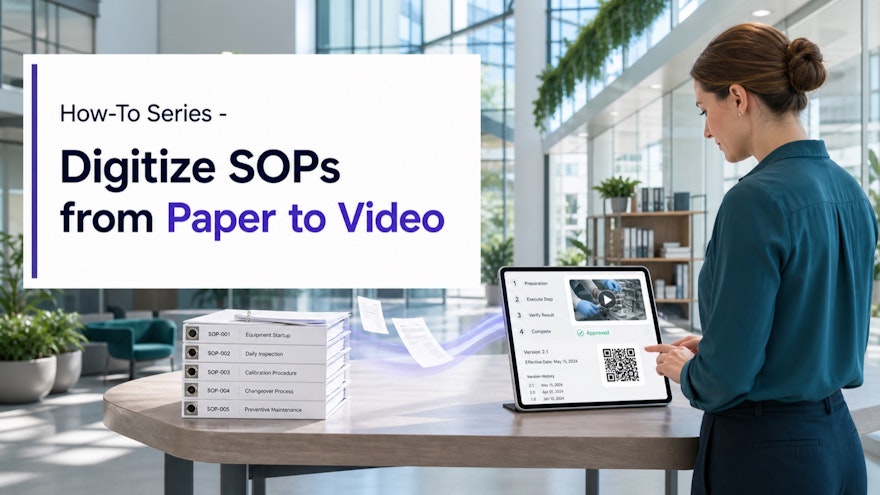
What SOP digitization really means
Scanning a binder and storing the PDF on a shared drive is electronic storage, but it is not a complete digital operating model. Employees may still struggle to find the current version, identify the step relevant to their role or translate a paragraph into action. A digital SOP system connects the authoritative procedure with visual execution guidance, training, assessments, access controls, approvals, version history and operational feedback.
Video adds value when seeing motion, sequence or context helps an employee perform correctly. It can demonstrate equipment setup, a system workflow, an inspection or a handoff. It should not hide the authoritative source or invent a simplified process. In many regulated organizations, the controlled SOP remains primary and the video is a governed training or job-aid layer linked to it.
Digitization is also a process-improvement opportunity. NIST’s lean and process improvement guidance focuses on eliminating waste through systematic improvement. Before reproducing every page digitally, remove duplicates, resolve contradictions and identify steps that exist only because of the paper workflow.
How to digitize SOPs from paper to video in nine steps
1. Inventory and prioritize the SOP library
Create a register with title, owner, process, site, role, status, version, review date, usage and risk. Identify duplicates and missing owners. Prioritize high-frequency tasks, recurring errors, high-risk decisions, long onboarding needs and procedures affected by imminent change. A pilot with clear operational value is safer than converting thousands of pages without a retrieval or governance plan.
2. Confirm the approved source
Verify that the paper copy matches the effective controlled document. Record the source identifier and version. Resolve handwritten amendments, local copies and unofficial workarounds through the appropriate process. If the procedure is inaccurate or unusable, fix it before creating multimedia derivatives. AI-generated training must be grounded in the approved source, not a random scan from a cabinet.
3. Map roles, risks and task outcomes
Identify who performs, verifies, approves and escalates each step. Define what each role must do and what successful execution looks like. Mark safety warnings, critical quality attributes, data-integrity requirements and exceptions that cannot be removed during simplification. Speach supports role-based training so employees receive the context and actions relevant to their responsibilities.
4. Redesign the information architecture
Separate the policy or controlled procedure from task instructions, checklists, decision aids and training. Break long content into descriptive, searchable modules. Use consistent names, metadata and links so an employee can move from the official SOP to a visual step and back. Do not split a high-risk process so aggressively that prerequisites or warnings disappear.
5. Create the visual workflow and video
Import the document into Speach’s AI training generator to draft structure, scripts, visual workflows and questions, or record an SME performing the approved task. Use screen capture for software, mobile footage for physical work and annotations for precise details. Keep the source-to-video relationship visible and require expert review of every generated instruction.
6. Add job aids, captions and assessments
Pair the video with a concise checklist or visual job aid when employees need reference during execution. Add realistic questions at meaningful decisions. Provide reviewed captions and transcripts; W3C’s caption guidance explains that captions include speech, speaker identity and meaningful non-speech audio. Translate from a validated master using an approved terminology glossary.
7. Review, validate and approve
Test the content with representative users and required devices. SMEs verify technical accuracy, L&D verifies learning design, and Quality or Compliance applies the organization’s risk-based requirements. Confirm permissions, links, assessments, language versions, exports and integrations. Document comments, resolution and approval rather than editing outside the governed workflow.
8. Publish at the point of work
Assign content by role and make it searchable through task language. Provide mobile or workstation access where permitted; a QR code may link employees to the current resource but should not bypass authentication or context. Use Speach’s mobile app for appropriate frontline access and enterprise integrations for LMS, intranet or other systems.
9. Retire paper copies and manage change
Follow the formal process for withdrawing, archiving or marking superseded paper. A source change should identify every affected video, job aid, translation, question and assignment. Review the impact, revise, approve and republish before the new version becomes effective. Avoid leaving old exports or downloaded files in uncontrolled locations.
The ideal digital SOP architecture
| Layer | Purpose | Required connection |
|---|---|---|
| Controlled SOP | Defines the authoritative process and responsibilities | Document owner, version and approval |
| Visual work instruction | Shows how to execute a task | Source step, role and effective version |
| Training module | Builds knowledge and decision capability | Objective, audience, assessment and assignment |
| Job aid or checklist | Supports performance during work | Current method and escalation route |
| Evidence layer | Records approval, completion and acknowledgement | User, timestamp, version and required signature |
| Feedback and analytics | Reveals questions, errors and improvement needs | Process owner and change-control workflow |
This architecture prevents the video from becoming a disconnected copy. Each layer serves a different user need while remaining traceable to the same controlled process. Speach’s SOP training software is designed to transform procedures into interactive training, AI videos, assessments, workflows and job aids.
Compliance and data-integrity controls
Regulated organizations should define intended use, validation, roles, access, records, retention and change management before rollout. FDA guidance on data integrity and CGMP compliance emphasizes reliable and accurate data. A digitized SOP ecosystem must preserve authorship, approvals, effective versions and required evidence rather than introduce ambiguity.
Apply unique accounts, least-privilege permissions, secure authentication, audit trails and electronic signatures where required. Record who created, reviewed, approved and changed content. Protect confidential process footage, personal data and proprietary documents. Speach’s security and compliance capabilities support enterprise governance, but every organization remains responsible for assessing its requirements and configuration.
Accessibility and multilingual quality are also controls. Employees must be able to perceive and understand the current instruction. Review captions, contrast, audio alternatives, device behavior and translation in the work context. Track each language version as a governed derivative of the approved master.
How to measure SOP digitization success
Measure migration quality first: percentage of prioritized SOPs with an accountable owner, current version, linked visual guidance, completed review and withdrawn obsolete copies. Track search success, time to find the correct instruction, access by device and update cycle time. These indicators show whether the digital system works as an information system.
Then measure performance: time to proficiency, correct first-time execution, deviations, errors, rework, support questions, audit observations and employee feedback. Use a baseline and account for equipment, staffing or process changes. A successful program does not simply produce more videos; it improves access to current knowledge and the consistency of execution.
Review adoption by role, site, shift and language. Low usage may reflect poor relevance, but it can also indicate missing devices, difficult authentication, weak search terms or supervisor habits. Investigate the workflow before blaming employees. A quarterly content-health review can identify overdue sources, broken links, untranslated revisions and assets that no longer support an active process.
Finally, document lessons from the pilot: which content types converted well, which required hands-on demonstration, how long review took and where governance created delays. Use that evidence to forecast the next migration wave rather than multiplying the pilot estimate by the entire library.
Frequently asked questions
What does it mean to digitize an SOP?
It means moving beyond a paper or static scan to a controlled digital system where the current procedure, visual instructions, role-based training, approvals, versions, access and evidence are connected.
Can a video replace the official SOP?
Not automatically. In many organizations the controlled SOP remains the authoritative document and the video is an execution or training layer linked to it. The quality system and intended use determine the approved relationship.
Can AI convert an SOP into a video?
AI can extract structure and draft scripts, visual steps, questions, captions and translations. Subject-matter and quality reviewers must verify the output against the effective source before approval.
How should digitized SOPs be version controlled?
Assign an owner, source version, content version, effective date, approver and review trigger. A source change should flag affected training and job aids, and superseded versions should be withdrawn from normal access.
How do you measure SOP digitization success?
Measure migration quality and operational performance: current-version access, search success, training completion, time to proficiency, deviations, errors, rework, support questions, audit observations and time required to update content.
Turn controlled procedures into guided execution
Speach helps regulated enterprises transform SOPs into visual, role-based, multilingual training and work instructions with approvals and traceability. Request a demo to plan your first SOP digitization pilot.